

Certification Topics of AZ-120 Exam PDF Recently Updated Questions
AZ-120 Exam Prep Guide: Prep guide for the AZ-120 Exam
Microsoft AZ-120 exam is designed for IT professionals who wish to specialize in planning and administering Microsoft Azure for SAP Workloads. Planning and Administering Microsoft Azure for SAP Workloads certification exam validates the skills and knowledge required to deploy and manage SAP solutions on the Azure cloud platform. AZ-120 exam measures one's ability to implement and manage Azure resources, including storage, virtual networks, and compute instances, to build and deploy SAP applications.
To prepare for the Microsoft AZ-120 certification exam, candidates should have a strong understanding of SAP architecture and Azure infrastructure. They should be familiar with Azure services such as Azure Virtual Machines, Azure Virtual Networks, and Azure Storage. Additionally, candidates should have experience with SAP applications such as SAP HANA, SAP NetWeaver, and SAP S/4HANA. It is also recommended that candidates complete the Microsoft Azure Administrator Associate certification before taking AZ-120 exam.
NEW QUESTION # 145
For each of the following statements, select Yes if the stamen is true. Otherwise, select No.
NOTE: Each correct selection is worth one point.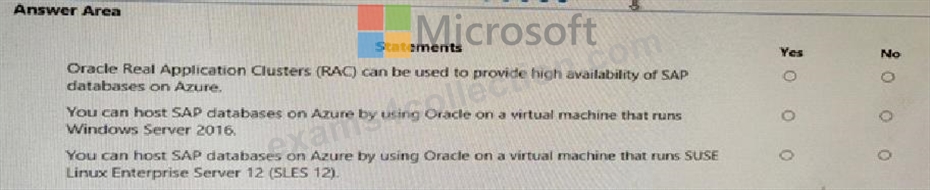
Answer:
Explanation: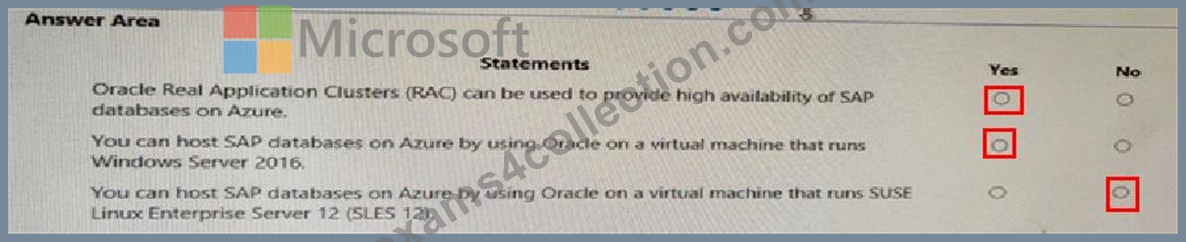
NEW QUESTION # 146
You are deploying SAP Fiori lo an SAP environment on Azure.
You are configuring SAML 2.0 for an SAP Fiori instance named FPP that uses client 100 to authenticate to an Azure Active Directory (Azure AD) tenant.
Which provider name should you use to ensure that the Azure AD tenant recognizes the SAP fiori instance?
- A. https://FPP
- B. ldap://FPP
- C. https://FPP100
- D. ldap://FPP-100
Answer: C
Explanation:
By default, the provider name is in the format <sid><client>. Azure AD expects the name in the format <protocol>://<name>. We recommend that you maintain the provider name as https://<sid><client> so you can configure multiple SAP Fiori ABAP engines in Azure AD.
Example: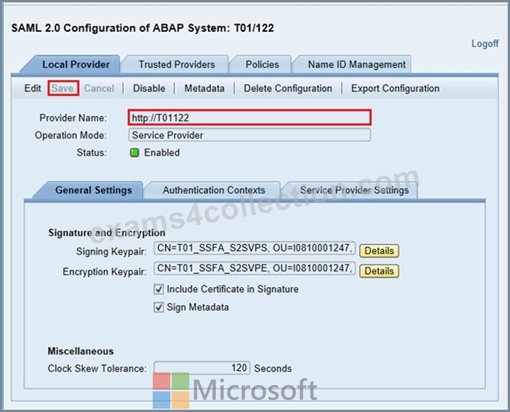
Reference:
https://docs.microsoft.com/en-us/azure/active-directory/saas-apps/sap-fiori-tutorial
NEW QUESTION # 147
For each of the following statements, select Yes if the statement is true. Otherwise, select No.
NOTE: Each correct selection is worth one point.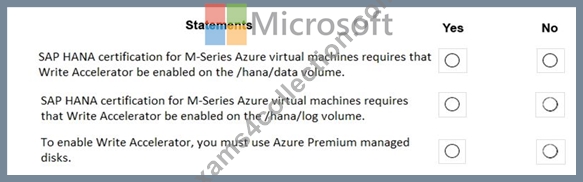
Answer:
Explanation: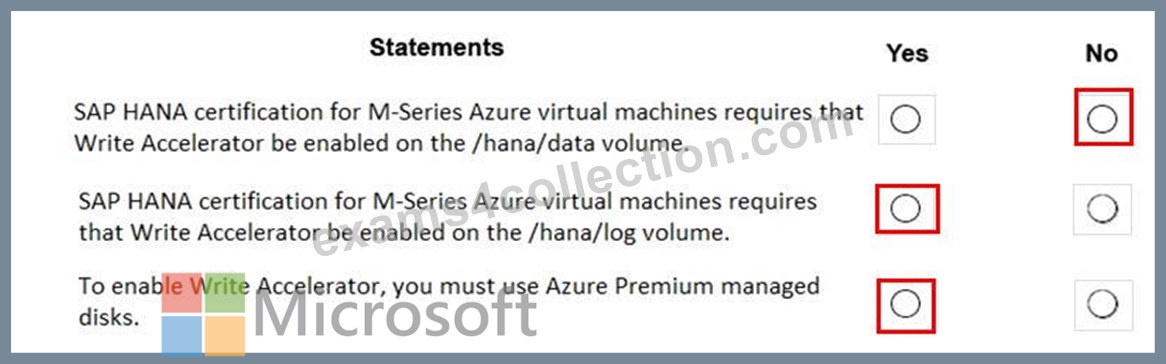
Reference:
https://docs.microsoft.com/en-us/azure/virtual-machines/workloads/sap/hana-vm-operations-storage
NEW QUESTION # 148
This question requires that you evaluate the underlined text to determine if it is correct.
You have an SAP environment on Azure that uses Microsoft SQL server as the RDBMS.
You plan to migrate to an SAP HANA database.
To calculate the amount of memory and disk space required for the database, you can use SAP Quick Sizer.
Instructions: Review the BOLD text, If the makes the stamen correct, select ''No change is needed. " if the statement is incorrect select the answer choice that makes the statement correct.
- A. /SDF/HDB_SIZING
- B. SQL Server Management Studio (SSMS)
- C. No change is needed.
- D. Azure Migrate
Answer: A
Explanation:
If you want to move an existing deployed system from another relational database management system (RDBMS) to HANA. SAP provides reports to run on your existing SAP system. If the database is moved to HANA, these reports check the data and calculate memory requirements for the HANA instance.
/SDF/HDB_SIZING is a standard Executable ABAP Report available within your SAP system (depending on your version and release level).
ABAP code listing snippet for SAP ABAP Report /SDF/HDB_SIZING
*&-------------------------------*
*& Report /SDF/HDB_SIZING // ZNEWHDB_SIZE
*&
*&-------------------------------*
*& Estimates the memory requirement in HANA of non-HANA databases *
*& When run on HANA, size the database using real memory consumption
*& values.
*&-------------------------------*
* * REPORT /SDF/HDB_SIZING LINE-SIZE 101 LINE-COUNT 90
NO STANDARD PAGE HEADING.
DATA: l_version TYPE c LENGTH 6 VALUE '54'. "54.2
TYPES: ty_para(2) TYPE n,
ty_top(3) TYPE n.
TYPE-POOLS: abap.
DATA: tabname TYPE tabname,
subrc TYPE sy-subrc,
p_prf TYPE abap_bool,
See full code listing within your SAP system using transactions such as SE80 and SE38 Reference:
https://www.se80.co.uk/sapreports/-/-fs-/-fs-sdf-fs-hdb_sizing.htm
https://docs.microsoft.com/en-us/azure/virtual-machines/workloads/sap/hana-sizing
NEW QUESTION # 149
You plan to deploy an SAP landscape in Azure.
You need to configure storage for the virtual machines that will host SAP Digital Boardroom. The solution must meet the following requirements:
* Encrypt all data by using a key generated by Azure Key Vault Managed HSM.
* Support a single disk size of 50 TB and 65,000 IOPS.
* Minimize costs.
Which disk type and encryption method should you use? To answer, select the appropriate options in the answer area.
NOTE: Each correct selection is worth one point.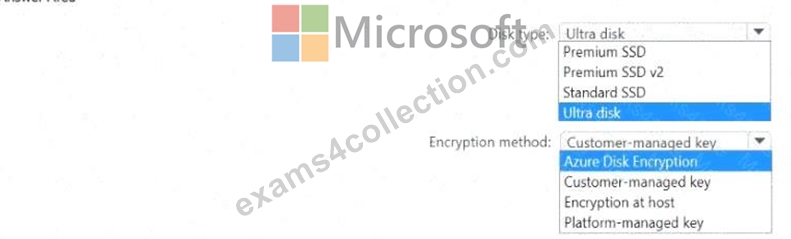
Answer:
Explanation: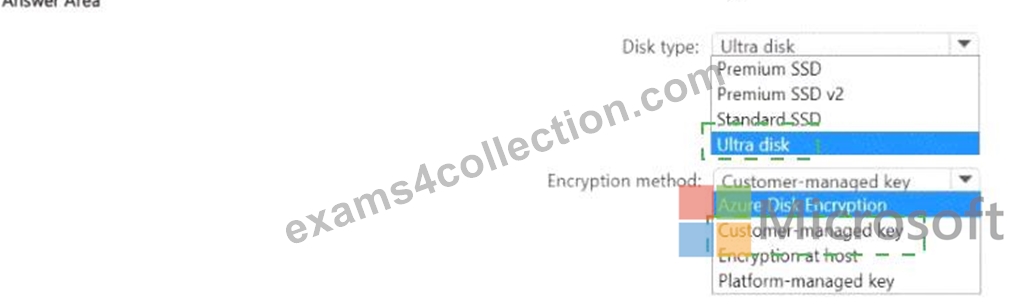
Explanation:
NEW QUESTION # 150
You have an on-premises SAP landscape that uses a DB2 database and contains an SAP Financial Accounting (SAP FIN) deployment. The deployment contains a file share that stores 50 TB of bitmap files. You plan to migrate the on-premises SAP landscape to SAP HANA on Azure (Large Instances) and Azure Files shares.
The solution must meet the following requirements:
* Minimize downtime.
* Minimize administrative effort.
You need to recommend a migration solution.
What should you recommend for each resource? To answer, drag the appropriate services to the correct resources. Each service may be used once, more than once, or not at all. You may need to drag the split bar between panes or scroll to view content.
NOTE: Each correct selection is worth one point.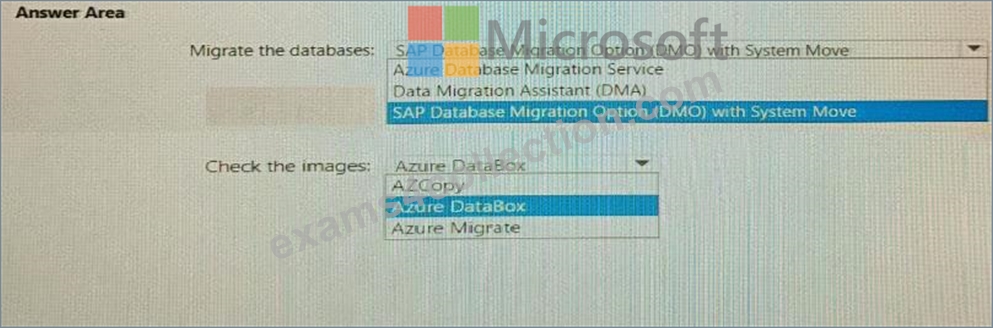
Answer:
Explanation: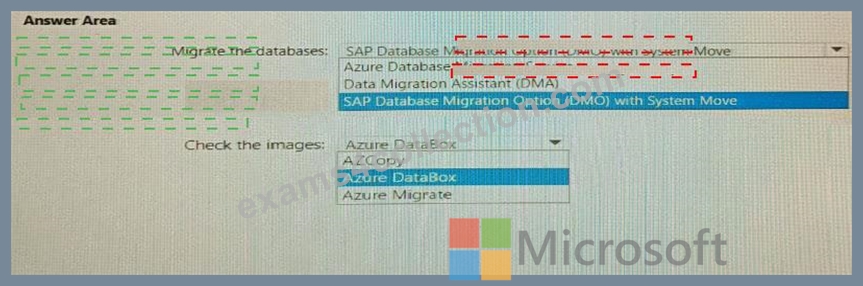
Explanation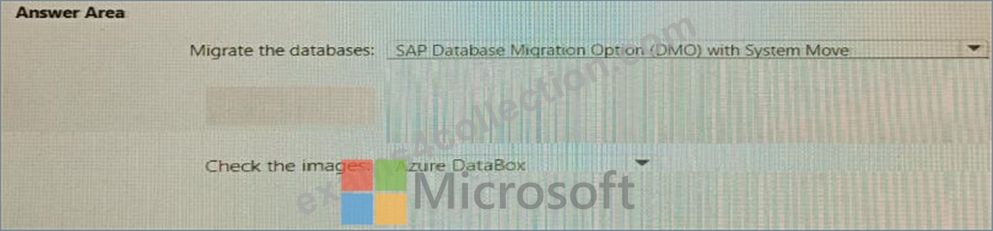
NEW QUESTION # 151
For each of the following statements, select Yes if the statement is true. Otherwise, select No.
NOTE: Each correct selection is worth one point.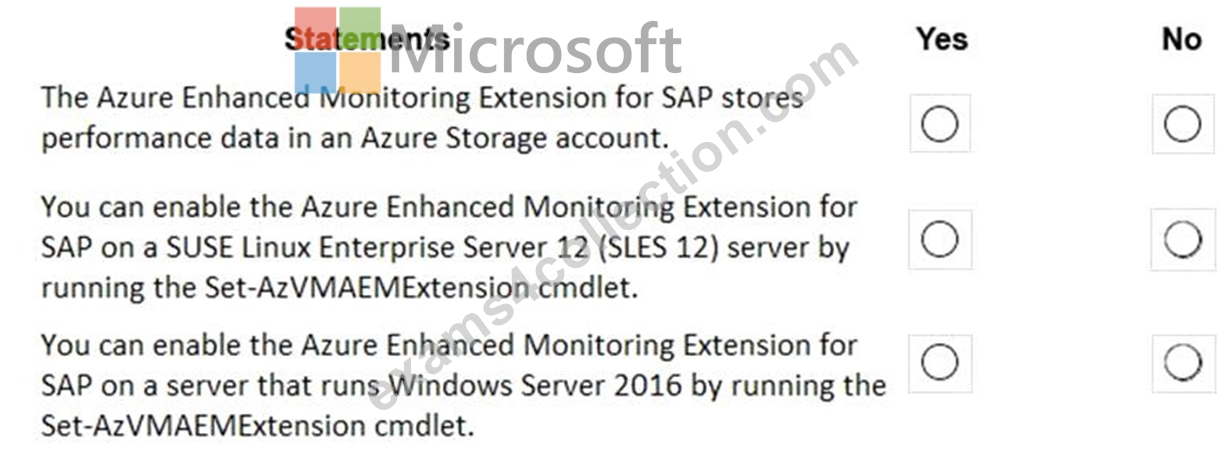
Answer:
Explanation: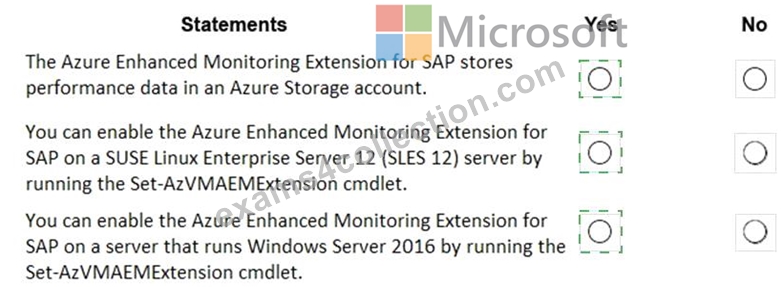
Explanation: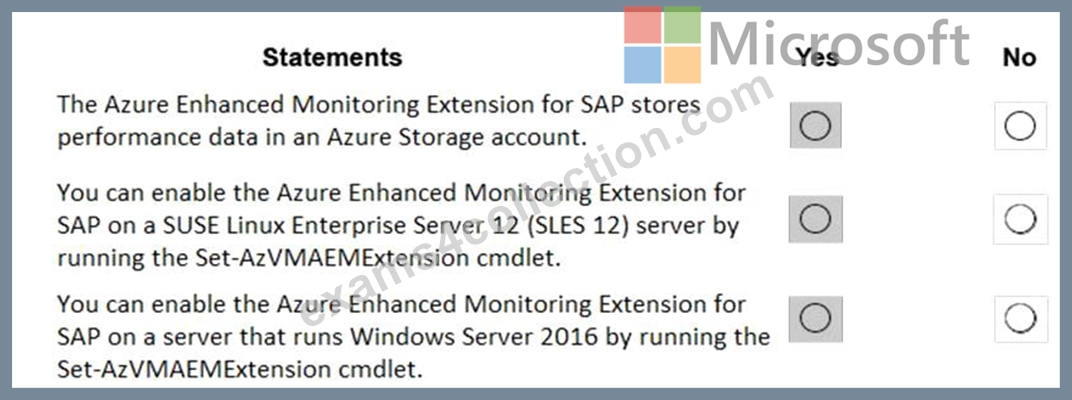
Box 1: Yes
The SAP Azure Enhanced Monitoring Extension builds on top of the Azure Diagnostic extension, which stores its data in an Azure Storage account that you specify.
Box 2: Yes
The Set-AzVMAEMExtension cmdlet updates the configuration of a virtual machine to enable or update the support for monitoring for SAP systems that are installed on the virtual machine. The cmdlet installs the Azure Enhanced Monitoring (AEM) extension that collects the performance data and makes it discoverable for the SAP system.
The -OSType specifies the OS. Either Windows or Linux.
Box 3: Yes
References:
https://docs.microsoft.com/en-us/azure/azure-monitor/platform/diagnostics-extension-overview
https://docs.microsoft.com/en-us/powershell/module/az.compute/set-azvmaemextension
NEW QUESTION # 152
For each of the following statements, select yes if the statement is true. Otherwise, select No.
NOTE: Each correct selection is worth one point.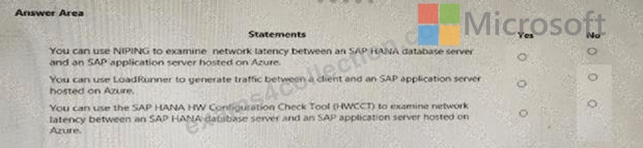
Answer:
Explanation: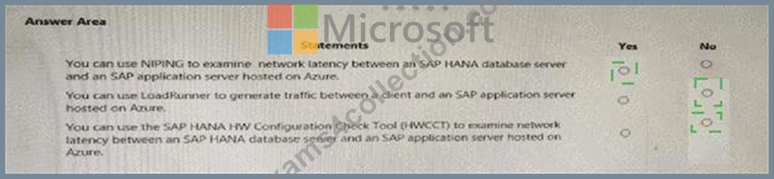
Explanation: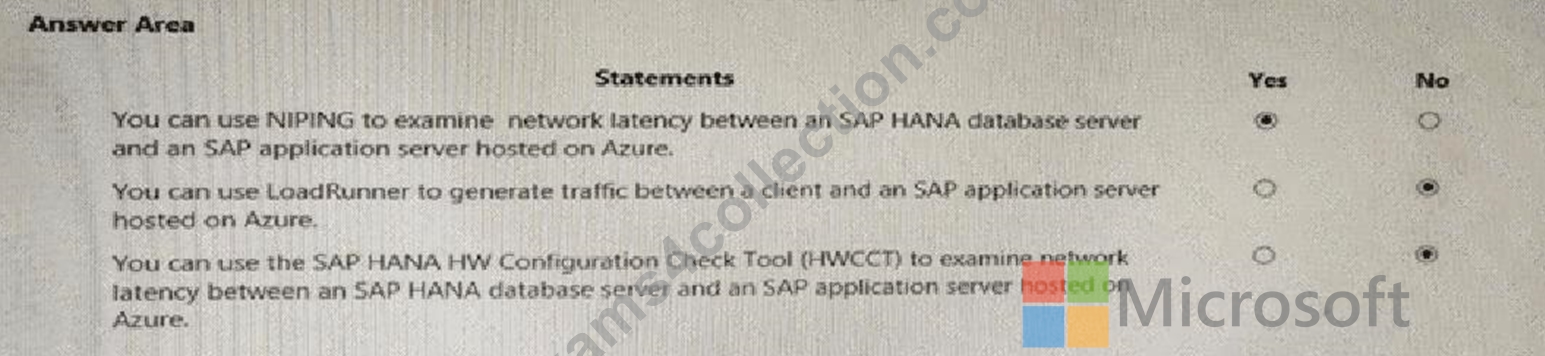
NEW QUESTION # 153
For each of the following statements, select Yes if the statement is true. Otherwise, select No.
NOTE: Each correct selection is worth one point.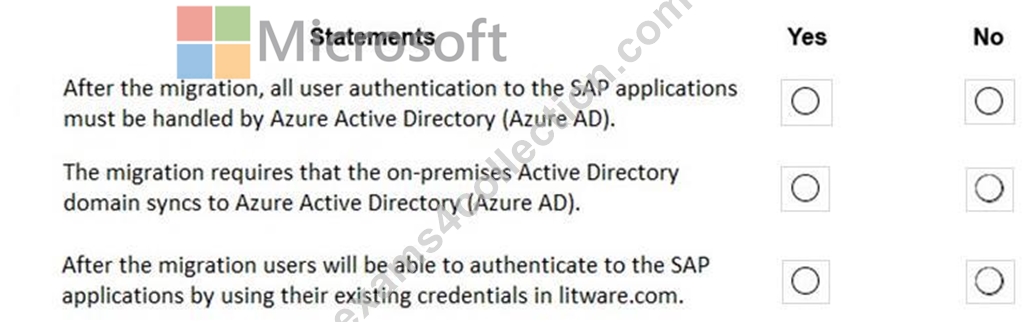
Answer:
Explanation: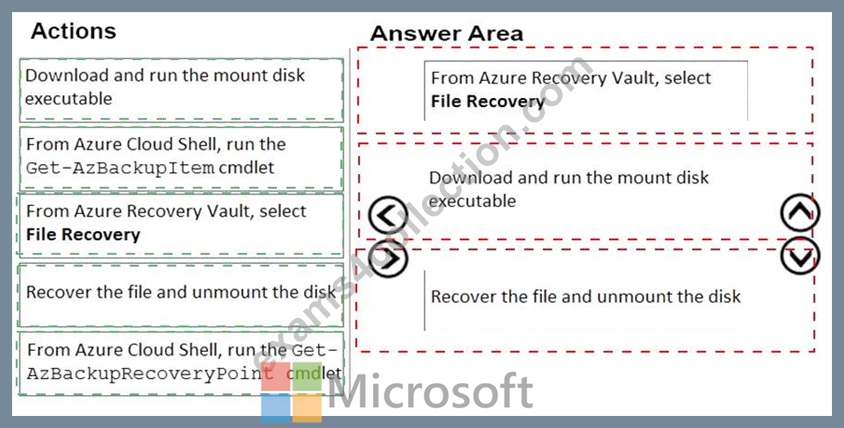
Explanation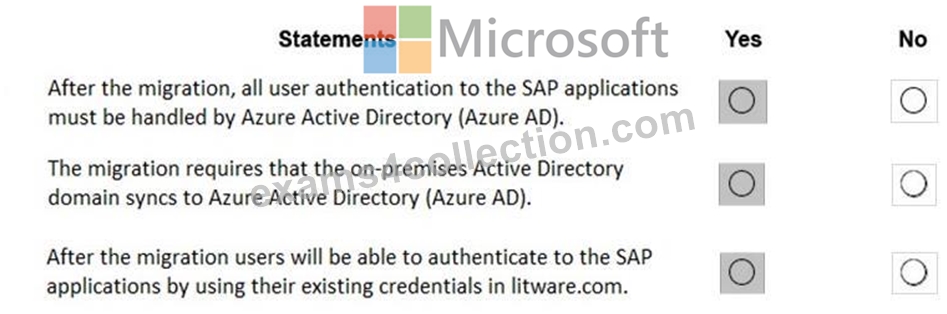
In a Hybrid-IT scenario, Active Directory from on-premises can be extended to serve as the authentication mechanism through an Azure deployed domain controller (as well as potentially using the integrated DNS).
It is important to distinguish between traditional Active Directory Servers and Microsoft Azure Active Directory that provides only a subset of the traditional on-premises AD offering. This subset include Identity and Access Management, but does not have the full AD schema or services that many 3rd party application take advantage of. While Azure Active Directory IS a requirement to establish authentication for the Azure virtual machines in use, and it can synchronize users with customers' on-premises AD, the two are explicitly different and customers will likely continue to require full Active Directory servers deployed in Microsoft Azure.
References:
https://www.suse.com/media/guide/sap_hana_on_azure_101.pdf
NEW QUESTION # 154
You have an on-premises SAP environment.
Backups are performed by using tape backups. There are 50 TB of backups.
A Windows file server has BMP images of checks used by SAP Finance. There are 9 TB of images.
You need to recommend a method to migrate the images and the tape backups to Azure. The solution must maintain continuous replication of the images.
What should you include in the recommendation? To answer, select the appropriate options in the answer area.
NOTE: Each correct selection is worth one point.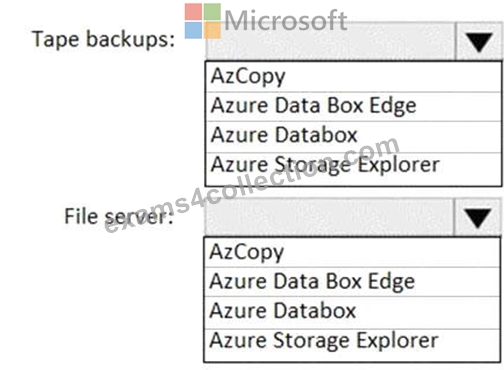
Answer:
Explanation: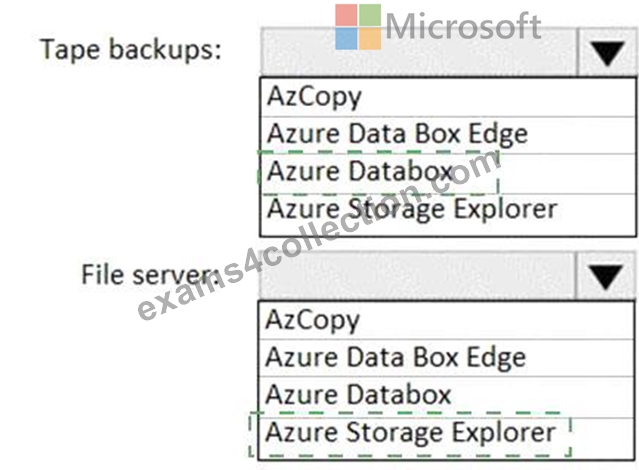
Explanation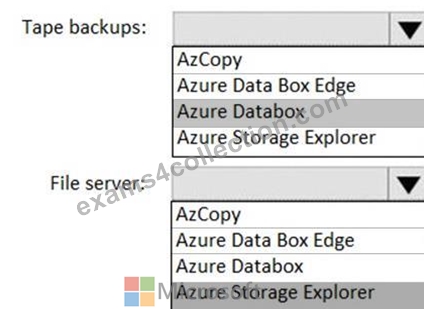
Tape backups: Azure DataBox
The Microsoft Azure Data Box cloud solution lets you send terabytes of data into Azure in a quick, inexpensive, and reliable way. The secure data transfer is accelerated by shipping you a proprietary Data Box storage device. Each storage device has a maximum usable storage capacity of 80 TB and is transported to your datacenter through a regional carrier. The device has a rugged casing to protect and secure data during the transit.
File server: Azure Storage Explorer
Azure Storage Explorer is an application which helps you to easily access the Azure storage account through any device on any platform, be it Windows, MacOS, or Linux. You can easily connect to your subscription and manipulate your tables, blobs, queues, and files.
NEW QUESTION # 155
You have an Azure subscription.
You plan to deploy a highly available SAP NetWeaver system to an Azure region that contains three availability zones. The system will be hosted in an Azure virtual machine scale set.
You need to recommend which type of deployment and which platformFaultDomainCount value to use. The solution must maximize the availability of the system.
What should you recommend? To answer, select the appropriate options in the answer area.
NOTE: Each correct selection is worth one point.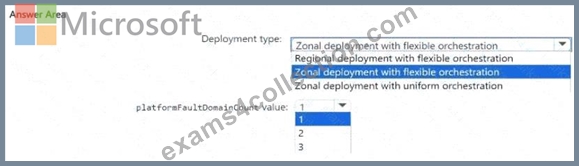
Answer:
Explanation: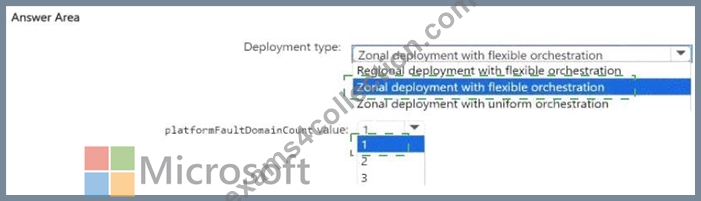
Explanation:
NEW QUESTION # 156
You need to connect SAP HANA on Azure (Large Instances) to an Azure Log Analytics workspace.
Which four actions should you perform in sequence? To answer, move the appropriate actions from the list of actions to the answer area and arrange them in the correct order.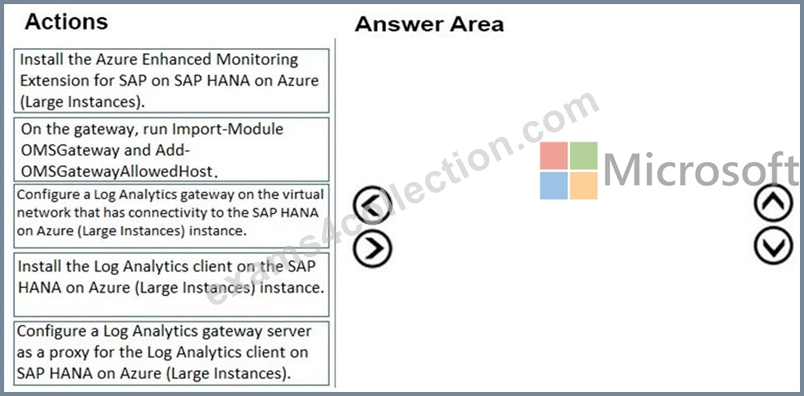
Answer:
Explanation: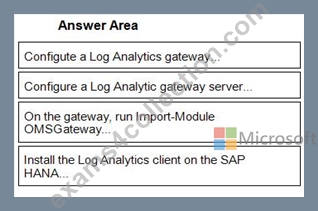
1 - Configute a Log Analytics gateway...
2 - Configure a Log Analytic gateway server...
3 - On the gateway, run Import-Module OMSGateway...
4 - Install the Log Analytics client on the SAP HANA...
Reference:
http://www.deployazure.com/compute/virtual-machines/sap-azure-enhanced-monitoring-extension/
https://docs.microsoft.com/en-us/azure/azure-monitor/platform/gateway
NEW QUESTION # 157
You have an on-premises SAP environment hosted on VMware VSphere that uses Microsoft SQL Server as the database platform.
You plan to migrate the environment to Azure. The database platform will remain the same.
You need gather information to size the target Azure environment for the migration.
What should you use?
- A. the SAP HANA sizing report
- B. the SAP EarlyWatch report
- C. Azure Advisor
- D. Azure Monitor
Answer: B
Explanation:
https://azure.microsoft.com/nl-nl/blog/sap-on-azure-architecture-designing-for-performance-and-scalability/
"For existing on-premises systems, you should reference system configuration and resource utilization data. The system utilization information is collected by the SAP OS Collecto
NEW QUESTION # 158
You have an SAP on Azure deployment that contains a production landscape and a non-production landscape.
You have the virtual machines shown in the following table.
You need to minimize the costs of the deployment for the next 12 months. The solution must meet the following requirements:
* Maintain SAP support
* Minimize application impact.
What should you do on each virtual machine? To answer, select the appropriate options in the answer are a. NOTE: Each correct selection is worth one point.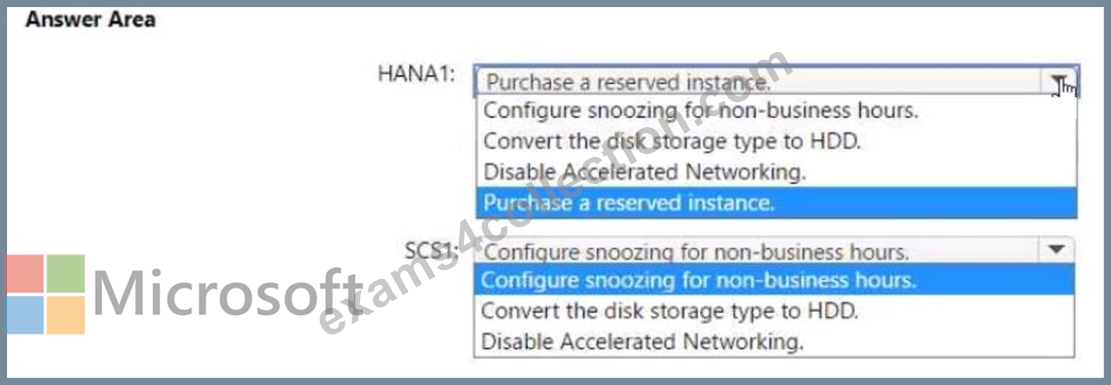
Answer:
Explanation: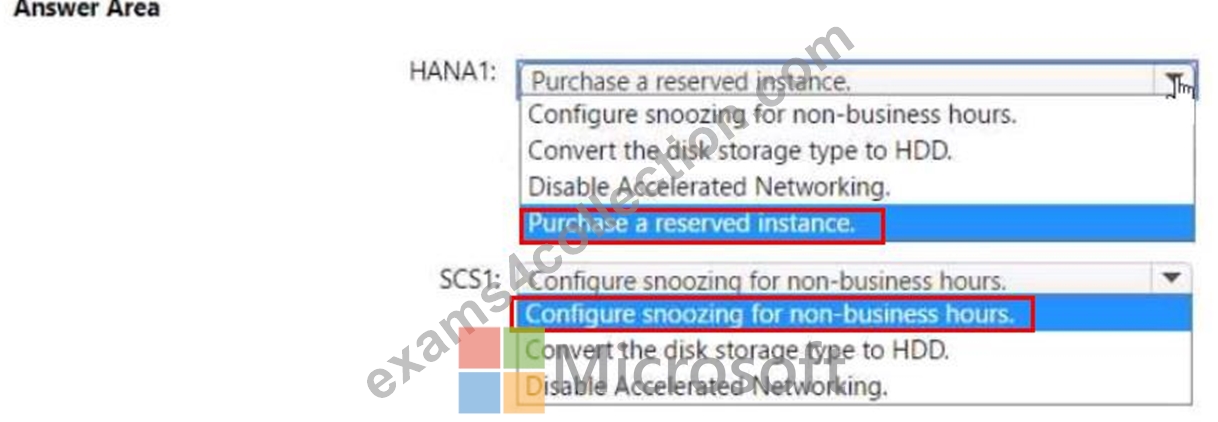
NEW QUESTION # 159
You are designing a four-node SAP Web Dispatcher deployment for an SAP on Azure landscape.
You need to recommend a resiliency solution and a load-balancing solution for the deployment. The solution must meet the following requirements;
* Receive the highest SLA from Microsoft.
* Load balance client connections.
* Minimize administrative effort
What should include in the recommendation for each solution? To answer, select the appropriate options in the answer area. NOTE Each correct selection is worth one point.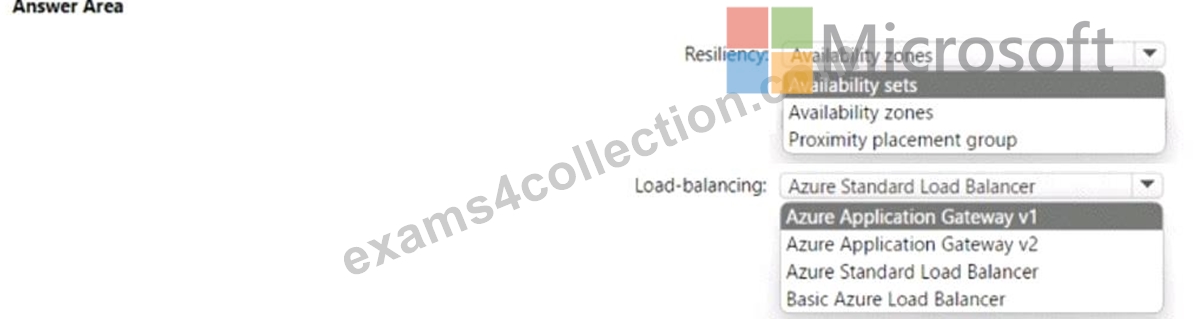
Answer:
Explanation: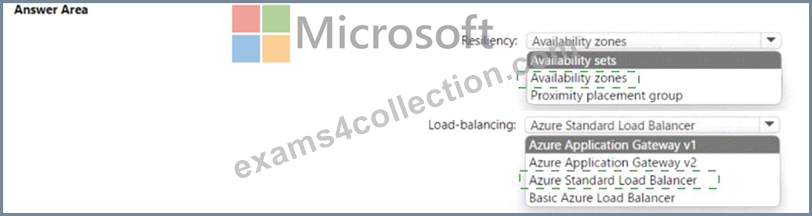
Explanation
NEW QUESTION # 160
You have an SAP landscape on Azure that contains the virtual machines shown in the following table.
You need to recommend a recovery solution in the event of an Azure regional outage. The solution must meet the following requirements:
* Minimize costs.
* Minimize data loss.
* Minimize administrative effort.
What should you recommend for each virtual machine? To answer, drag the appropriate services to the correct virtual machines. Each service may be used once, more than once, or not at all. You may need to drag the split bar between panes or scroll to view content.
NOTE: Each correct selection is worth one point.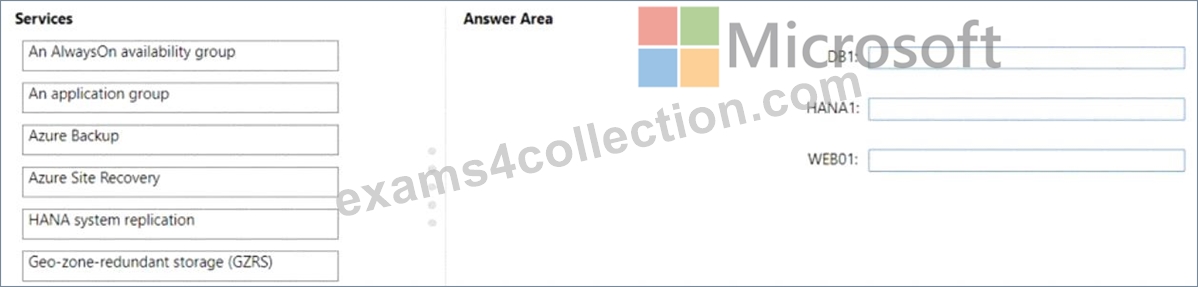
Answer:
Explanation: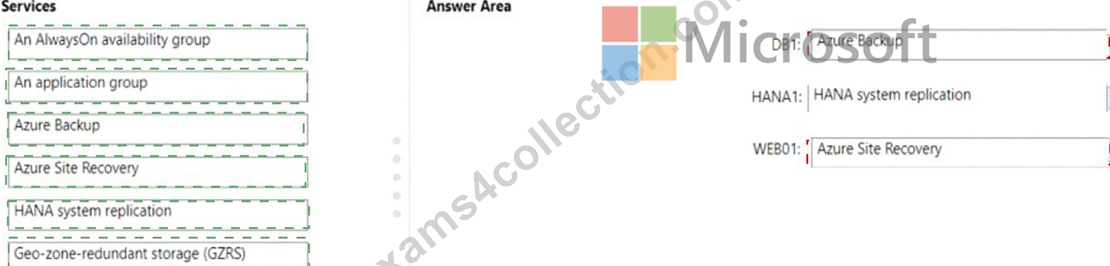
Explanation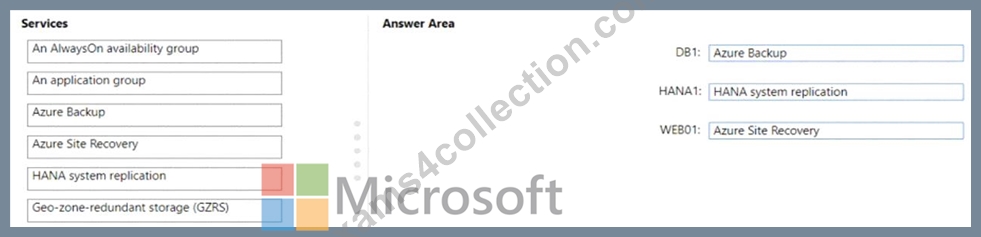
NEW QUESTION # 161
You plan to deploy SAP application servers that run Windows Server 2016.
You need to use PowerShell Desired State Configuration (DSC) to configure the SAP application server once the servers are deployed.
Which Azure virtual machine extension should you install on the servers?
- A. the Azure Enhanced Monitoring Extension for SAP
- B. the Azure virtual machine extension
- C. the Azure Chef extension
- D. the Azure DSC VM Extension
Answer: D
Explanation:
The Azure Desired State Configuration (DSC) VM Extension is updated as-needed to support enhancements and new capabilities delivered by Azure, Windows Server, and the Windows Management Framework (WMF) that includes Windows PowerShell.
Reference:
https://docs.microsoft.com/en-us/powershell/scripting/dsc/getting-started/azuredscexthistory
NEW QUESTION # 162
You plan to deploy two Azure virtual machines that will host an SAP HANA database for an SAP landscape.
The virtual machines will be deployed to the same availability set. You need to meet the following requirements:
* Ensure that the virtual machines support disk snapshots.
* Ensure that the virtual machine disks provide submillisecond latency for writes.
* Ensure that each virtual machine can be allocated disks from a different storage cluster.
Which type of operating system disk and HANA database disk should you use? To answer, select the appropriate options in the answer area. NOTE Each correct selection is worth one point.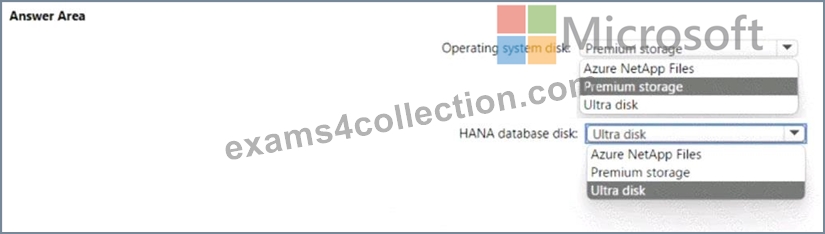
Answer:
Explanation: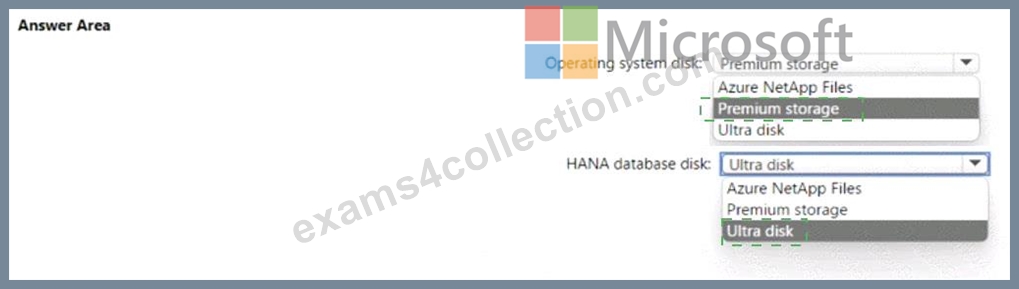
Explanation: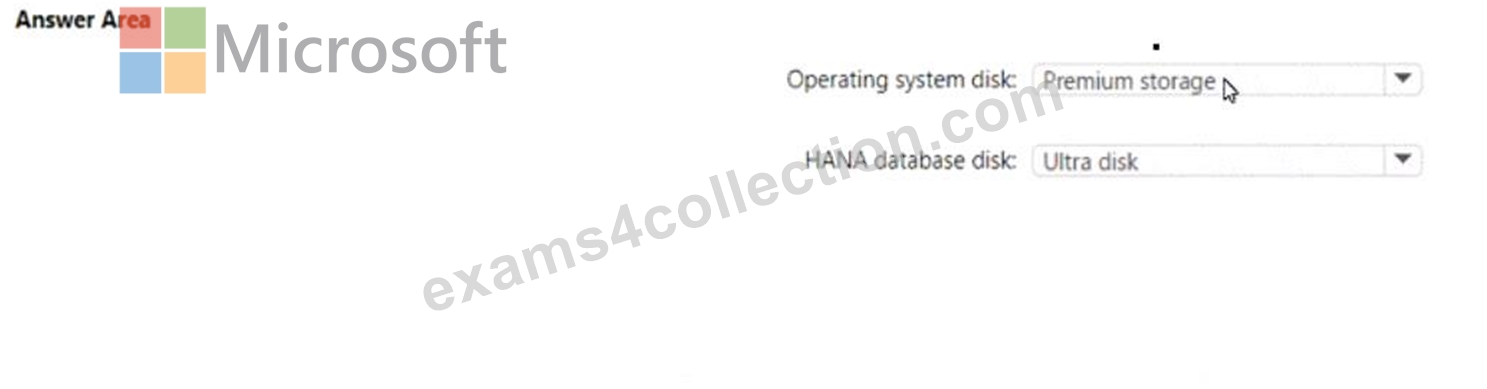
NEW QUESTION # 163
You have an SAP environment on Azure.
You use Azure Recovery Services to back up an SAP application server.
You need to test the restoration process of a file on the server.
Which three actions should you perform in sequence? To answer, move the appropriate actions from the list of actions to the answer area and arrange them in the correct order.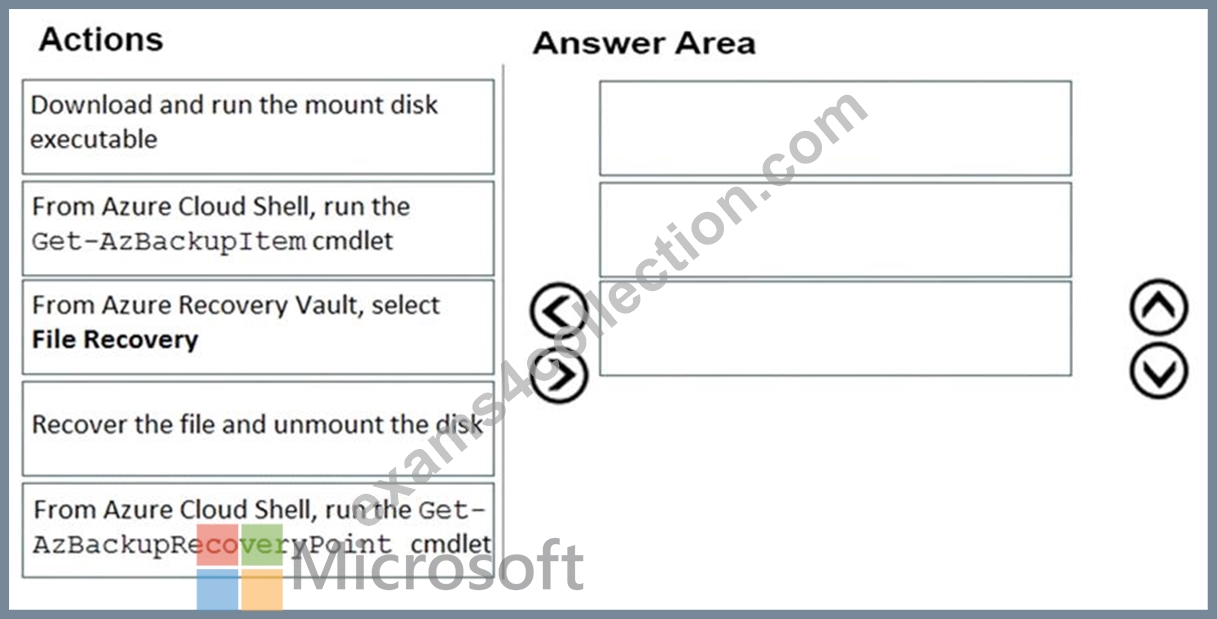
Answer:
Explanation: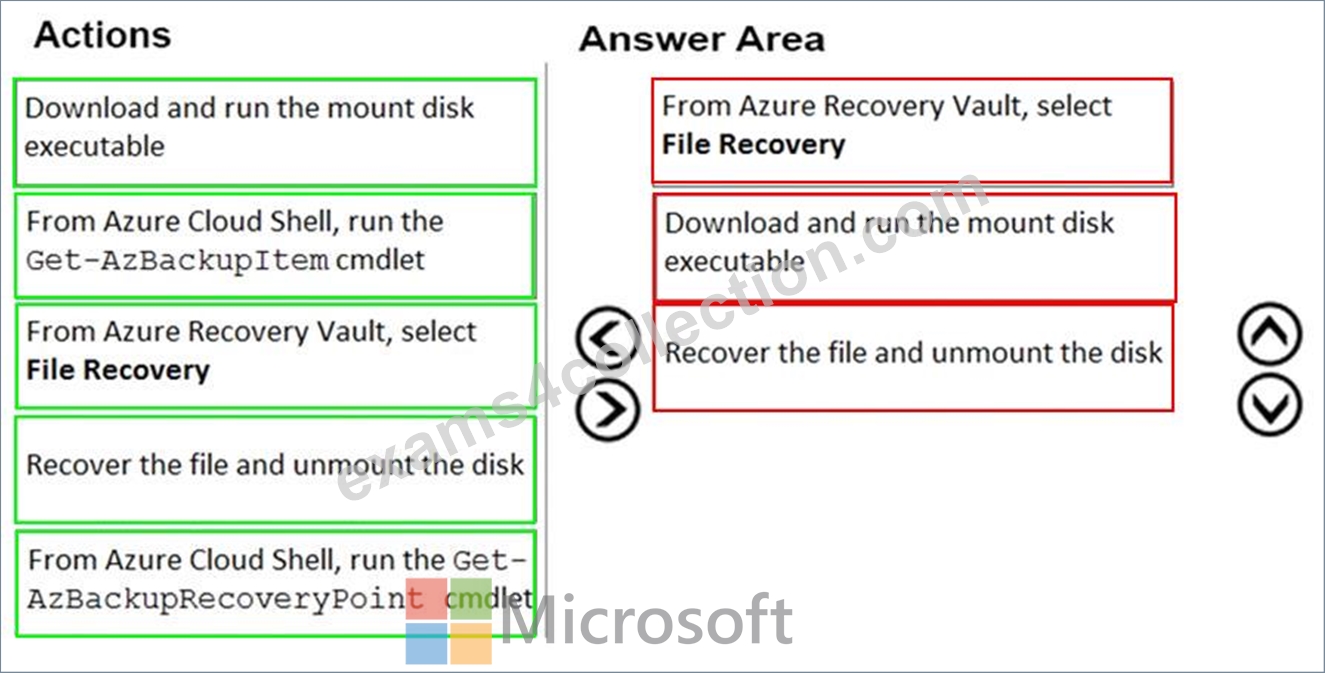
Explanation:
Step 1: From Azure Recover Vault, select File Recovery
To restore files or folders from the recovery point, go to the virtual machine and choose the desired recovery point.
Step 2: Download and run the mount disk executable
Step 3: recover the file and unmount the disk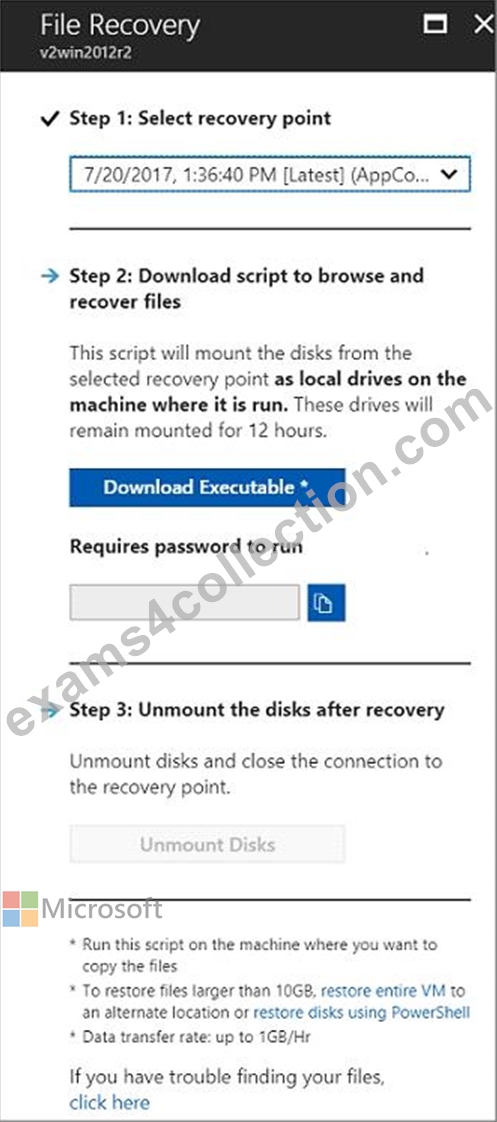
NEW QUESTION # 164
You migrate SAP ERP Central Component (SAP ECC) production and non-production landscapes to Azure.
You are licensed for SAP Landscape Management (LaMa).
You need to refresh from the production landscape to the non-production landscape.
Which four actions should you perform in sequence? To answer, move the appropriate actions from the list of actions to the answer area and arrange them in the correct order.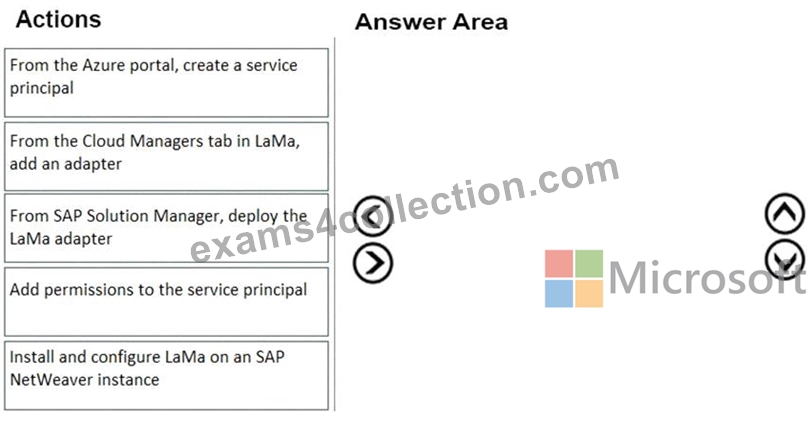
Answer:
Explanation: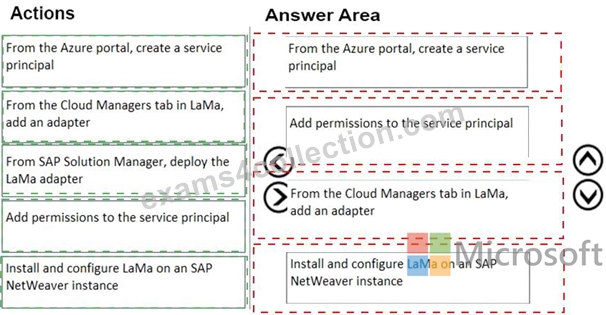
Explanation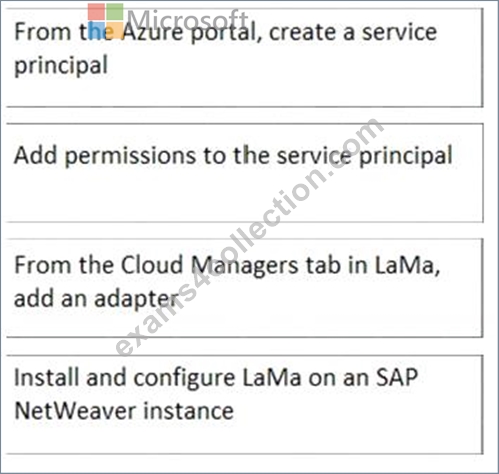
Step 1: From the Azure portal, create a service principal
The Azure connector can use a Service Principal to authorize against Microsoft Azure. Follow these steps to create a Service Principal for SAP Landscape Management (LaMa).
Step 2: Add permissions to the service principal
The Service Principal does not have permissions to access your Azure resources by default. You need to give the Service Principal permissions to access them.
Step 3: From the Cloud Managers tab in LaMa, add an adapter
Create a new connector in SAP LaMa
Open the SAP LaMa website and navigate to Infrastructure. Go to tab Cloud Managers and click on Add.
Select the Microsoft Azure Cloud Adapter
Step 4: Install and configure LaMA on an SAP NetWeater instance
Provision a new adaptive SAP system
You can manually deploy a new virtual machine or use one of the Azure templates in the quickstart repository.
It contains templates for SAP NetWeaver ASCS, SAP NetWeaver application servers, and the database. You can also use these templates to provision new hosts as part of a system copy/clone etc.
Note: To support customers on their journey into a cloud model (hybrid or entirely public cloud), SAP and Microsoft partnered to create an adapter that integrates the SAP management capabilities of LaMa with the IaaS advantages of Microsoft Azure.
References:
https://docs.microsoft.com/en-us/azure/virtual-machines/workloads/sap/lama-installation
https://docs.microsoft.com/en-us/learn/modules/maintain-azure-sap-workloads/2-set-up-remote-management
NEW QUESTION # 165
You have an SAP production landscape on Azure that contains the virtual machines shown in the following table.
VM1 cannot connect to an employee self-service application hosted on VM2.
You need to identify what is causing the issue.
Which two options in Azure Network Watcher should you use? Each correct answer presents part of the solution.
NOTE: Each correct selection is worth one point
- A. Connection troubeshoot
- B. Connection monitor
- C. Network Performance Monitor
- D. IP flow verify
Answer: A,D
NEW QUESTION # 166
......
2025 New Preparation Guide of Microsoft AZ-120 Exam: https://www.exams4collection.com/AZ-120-latest-braindumps.html
AZ-120 Practice Exam - 291 Unique Questions: https://drive.google.com/open?id=1Cz3zZYw9eGZqQ87Zb0xmnrvbQg0If0b_
